Version 0.1.0 is now available

Reclaim Your Mac with
Efficiency.

The intelligent cleaner for developers. Scan projects, uninstall apps completely, and automate maintenance with AI recommendations.

Download for macOSLearn more

Free · macOS 11+ · ~3 MB · first launch: right-click → Open
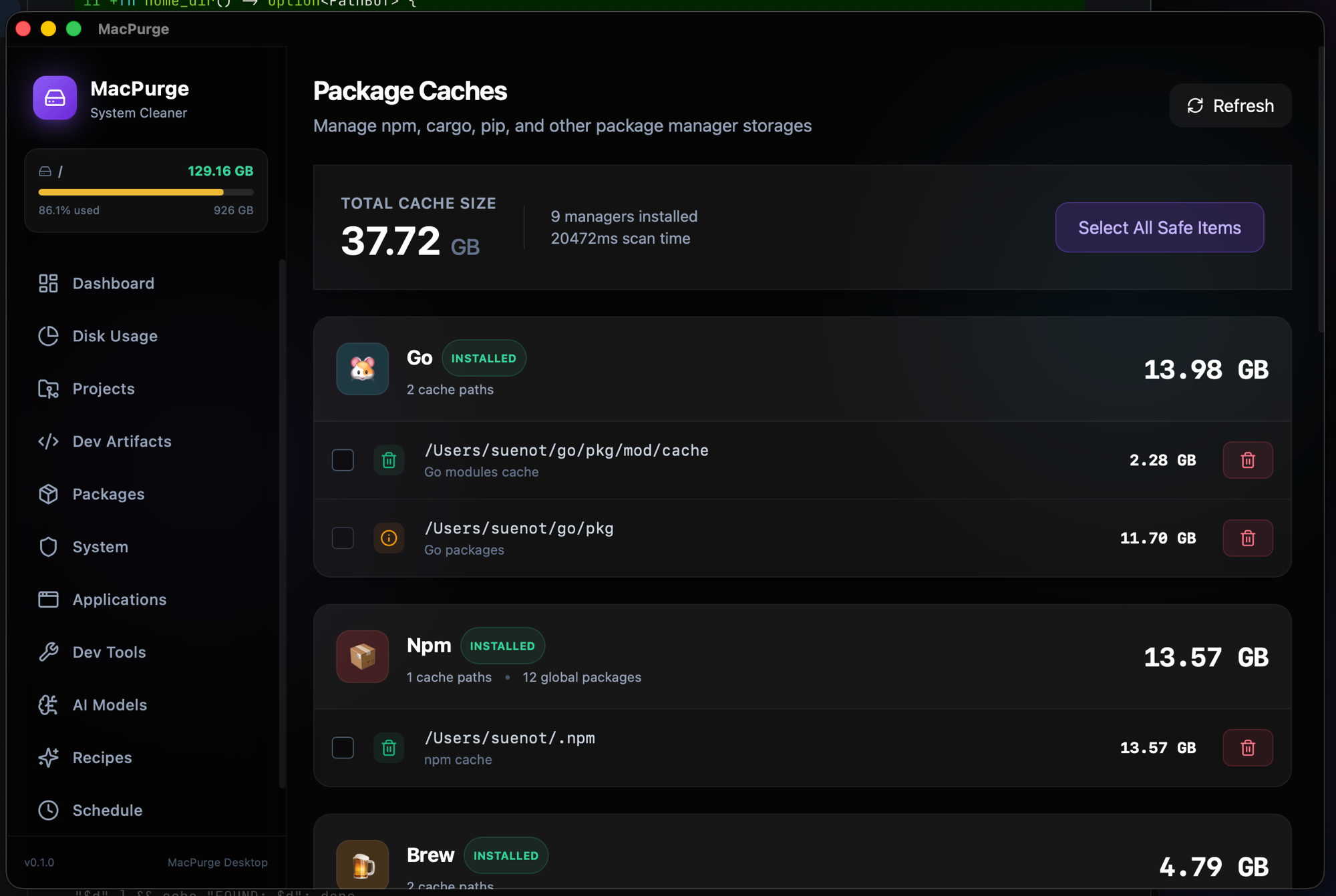
MacPurge — Package Caches

Project Artifacts

Traditional cleaners ignore your code. macpurge scans deeper to find forgotten node_modules, build targets, and virtual environments hidden in your source folders.

  • Auto-detects Node.js, Rust, Python, Go, and Java
  • Calculates real disk usage of dependency folders
  • Smart exclusion for active production environments
  • One-click purge for stale projects (>30 days)
node_modules1.2 GB
target/850 MB
.venv420 MB

App Uninstaller

Dragging to Trash isn't enough. Our deep auditor tracks every related file—from Application Support to hidden LaunchAgents—ensuring a clean wipe.

  • Finds hidden Plists, Caches, and Logs
  • Monitors system-wide remnants in real-time
  • Cleans leftover Docker containers from apps
  • Visual audit of every linked file before deletion
Slack.app
Total: 1.4 GB
~/Library/Application Support/Slack
~/Library/Caches/com.tinyspeck.slackmacgap
~/Library/Preferences/com.slack.plist
Uninstalled with 12 related items removed

AI Recommendations

Powered by Claude, macpurge analyzes your workflow to suggest what's safe to delete. No more guessing which cache is essential.

  • Personalized advice based on project activity
  • Explains why an artifact is safe to remove
  • Detects duplicate dependencies across projects
  • Prioritizes cleanup tasks for maximum disk gain
Claude says:

"You haven't touched the finance-app project in 3 months. Deleting its node_modules will reclaim 820MB without affecting your current work."

Dev-Tools Cleaner

Reclaim dozen of gigabytes from heavy development environments. One click to purge stale simulator runtimes, old archives, and unused Docker layers.

  • Xcode: DerivedData, iOS DeviceSupport, and Archives
  • Android: AVD images and Gradle distribution caches
  • Docker: Prune dangling images and build cache
  • VM Support: Identifies large Parallels and UTM images
Xcode
14.2 GB
Docker
8.7 GB
Android
12.4 GB
VMs
26.1 GB
Overall Disk PressureHigh

Local AI Model Cleaner

LLMs eat disks alive. macpurge hunts down the multi-gigabyte model weights scattered by your local AI tooling and lets you reclaim them in one click.

  • Ollama, LM Studio, and the Hugging Face cache
  • Detects MLX, paroquant, and diffusers downloads
  • Finds ComfyUI checkpoints, VAEs, and LoRAs
  • Per-model breakdown — keep what you use, purge the rest
z-lab / Qwen3.5-27B-PAROparoquant
18 GB
LM Studio · Qwen3-27B-MLX-4bitmlx
12 GB
dealignai / Gemma-4-26B (vmlx)vmlx
15 GB
ComfyUI · CosyVoice3comfyui
9.1 GB
Ollama · qwen3:8bollama
1.4 GB
~55 GB reclaimable

Scheduled Maintenance

Never worry about disk space again. Automate your housekeeping with macOS LaunchAgents that run in the background without affecting performance.

  • Custom weekly or monthly cleanup cycles
  • Automatic purging of artifacts older than 30 days
  • Stealth mode: runs only when system is idle
  • Native macOS notifications for cleanup reports
Next Cleanup: Sun 03:00

Ready-to-use Recipes

Built-in library of maintenance scripts contributed by the community. Purge browser bloat, clear global caches, or reset dev environments instantly.

  • Purge npm, Cargo, and Homebrew caches safely
  • Clean browser logs and caches (Chrome, Arc, Safari)
  • Reset VS Code and JetBrains IDE caches
  • Community recipes for exotic dev-tools
Clear npm Cache
Purge Xcode
Clean Chrome Logs
Reset Cargo
Wipe Android AVD
Clean Pip Cache

Visual Disk Map

Navigate your storage like a pro. macpurge wraps the blazing-fast Rust core in a beautiful Sunburst or Treemap visualization for instant insight.

  • Interactive Sunburst view for deep drill-downs
  • Squarified Treemap for efficient space analysis
  • Real-time navigation through millions of files
  • Integrated QuickLook for instant file previews
/Projects

Live Tray Watcher

Keep an eye on your storage without leaving your workflow. The native macOS tray utility provides a real-time glance at your disk health.

  • Live free space counter in your menu bar
  • Visual red alert when space drops below 10GB
  • Quick access to scanning and AI cleanup
  • Low-impact background monitoring
8.2 GB
Menu Bar Monitor
Disk Pressure: Low Space!

Power at your
Fingertips.

Whether you prefer a sleek native app or the raw power of the terminal, macpurge provides the tools you need to stay productive.

  • Automated cleanup via macOS LaunchAgents
  • Deep uninstallation of heavy dev tools
  • Reclaim local AI model weights (Ollama, LM Studio, ComfyUI)
  • Visual Treemap (GUI) wrapping Rust CLI core
zsh
# Scan for fat node_modules
$ macpurge scan ~/projects --dev

# Reclaim local LLM & diffusion weights
$ macpurge scan-ai

# Clean with AI guidance
$ macpurge ask "Which projects haven't been touched in 6 months?"

# Purge all package manager caches
$ macpurge clean all --yes
Scan complete. Found 42GB of cleanable artifacts.

Ready to Purge?

Free CLI core. Premium GUI experience.
Join developers who keep their Macs running at peak performance.

Get Started NowWhat's new